
PoE Switches & PoE Extenders | Trade Stock
2 products in our Data Comm & Networking range — trade-grade UK stock from CCTV Line.
Shop PoE Switches by type
2 products
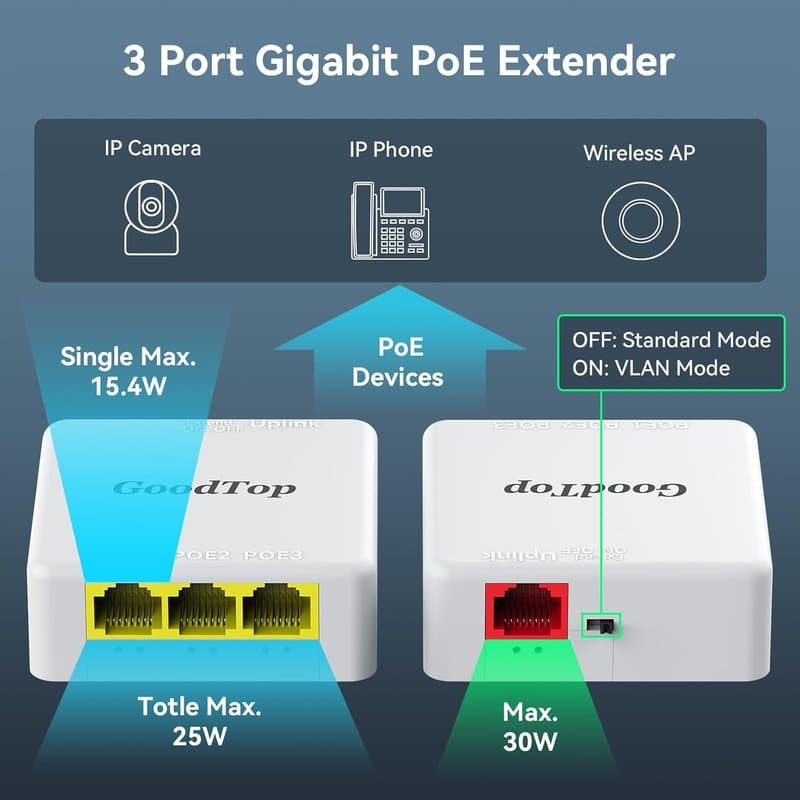
PoE extender – gigabit — 4 Port Gigabit POE Extender 1000M Network Switch Repeater IEEE802.3af/at Plug&Play for PoE Switch NVR IP Camera AP
GoodTop | PoE-Extender-Repeater-4-Port-Gigabit-1000M
- 4 PoE ports
- Gigabit
- 4 ports

16-port PoE switch – 240W PoE budget – 10/100 — Dahua PFS4218-16ET-240 Desktop , 16-Port Managed 2-Layer PoE Switch, 16 × RJ45 10-100M, 240W
Dahua | DH-PFS4218-16ET-240
- 16 PoE ports
- 240W
- 10/100
- Managed
- 16 ports
Application IP camera power and data
PoE Switches: the range at a glance
This range covers PoE switches for powering and networking IP cameras, access points and other Powered Devices over a single Ethernet run, cutting down on separate power cabling at each camera position.
PoE (Power over Ethernet) delivers both data and DC power down the same Cat5e/Cat6 cable, so an IP camera only needs one cable back to the switch rather than a mains supply plus a network drop.
How to choose
- Channel count: match the number of PoE ports to the number of cameras or access points on site, plus any spare ports for future expansion.
- PoE budget: check the switch's total power budget against the combined power draw of every connected device — this is the single most common install-time failure point.
- Standard supported: confirm which PoE standard (802.3af/at/bt, or a vendor's proprietary implementation) matches your camera's requirements, as under-powering causes reboots or reduced IR range.
- Unmanaged vs managed: decide whether the job needs basic plug-and-play switching or VLAN/QoS control for larger, segmented networks.
- Rack or desktop form factor: consider how the switch will be mounted alongside other data comm equipment in the cabinet or comms room.
Across this PoE Switches range, always cross-check the switch's per-port and total power budget against your camera schedule before specifying it on a quote.
PoE Switches — frequently asked questions
What does a PoE switch do in a CCTV install?
It supplies both network data and DC power to IP cameras over a single Ethernet cable, removing the need for a separate mains supply at each camera.
How many PoE ports do I need?
Count every camera or access point to be connected, then add spare ports for future expansion; this range includes switch options to match varying channel counts.
Related guides
- Ethernet Splitters & PoE: Types and LimitsA passive ethernet splitter is not a network switch, and it is a poor fit for PoE CCTV cameras.
- Cat6 vs Cat6a: Speed, PoE & When to UpgradeCat6 is the right cable for most single-camera and short-run CCTV drops; Cat6a earns its higher cost on long runs, dense multi-camera bundles, and 4K/PTZ…
- Cat5e 50m for PoE CCTV: Limits, Voltage Drop 2026A 50m Cat5e run sits well inside the standard's rated distance and will typically carry Gigabit data and PoE without issue for a single fixed camera — the…
- Best RJ45 Connectors for CCTV PoE 2026Get the connector wrong on a CCTV run and the fault won't show up as a dead camera — it'll show up months later as random dropouts your DVR logs blame on…