
dvr meaning
DVR Meaning in CCTV: What a Digital Video Recorder Does
DVR stands for digital video recorder.
On this page
- What does DVR mean in CCTV?
- Other searches for "DVR meaning"
- How do you tell whether you own a DVR, an NVR or a hybrid?
- What "hybrid" and "5-in-1" mean
- Write these down before deciding
- When is it still fine to keep a DVR?
- Cases where keeping it makes sense
- Upgrading only the recorder
- When should you move to an NVR and IP cameras?
- The trade-offs
- Can you upgrade in stages without scrapping the DVR?
- Reuse caveats
- Security basics
- The trade route
- Related products
DVR stands for digital video recorder. In CCTV it is the box that digitises and records footage from analogue or HD-analogue cameras connected by coax, and it remains a sound choice if your cameras and cabling are healthy. Replace it when you need IP-only features or when the coax run itself is the weak point, in which case an NVR with IP cameras is the better route. For a quick side-by-side of the two recorder types, see how NVR and DVR differ.
What does DVR mean in CCTV?
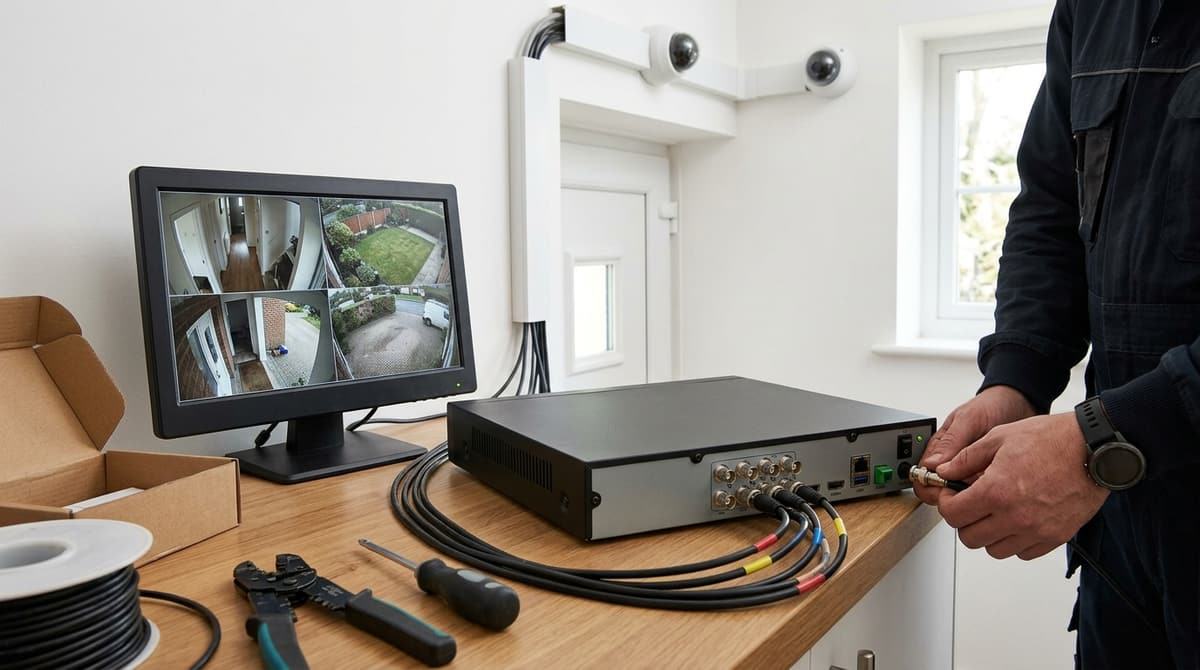
DVR stands for Digital Video Recorder: in CCTV, the box that takes raw video from analogue cameras, encodes it and stores it on a hard drive. The cameras send an unprocessed signal down coax, and all the encoding happens inside the recorder. The expansion is confirmed by Merriam-Webster, Collins and the NIST CSRC glossary.
Other searches for "DVR meaning"
- DVR meaning TV: a set-top box or built-in feature that records broadcasts to a hard drive. In the UK it is usually called a PVR, per Wikipedia and Computer Hope.
- DVR meaning car or camera: as general guidance, a dash-cam sold as a "car DVR" is a camera with the recorder built in, saving to a memory card. It has no separate box.
- DVR meaning YouTube: streaming services use the word for stored recordings of live broadcasts.
The same letters mean unrelated things in other fields, including military and medical usage. Context decides which applies, and this article covers only the recording sense.
How do you tell whether you own a DVR, an NVR or a hybrid?
Check what plugs into the camera and the recorder: BNC coax means a DVR or hybrid, while RJ45 network cable means an NVR.
- Camera end: a BNC plug (a twist-lock round connector) points to analogue, while an RJ45 plug points to IP.
- Cable: coax, or siamese (coax with a power pair bonded alongside), suggests analogue. Cat5e or Cat6 suggests IP.
- Recorder rear panel: a row of BNC inputs means DVR or hybrid. Numbered RJ45 ports, often PoE, mean NVR.
- Model label: "DVR" and "NVR" are self-explanatory, while "XVR" usually marks a hybrid that accepts several analogue formats.
What "hybrid" and "5-in-1" mean
A hybrid recorder takes analogue formats (TVI, AHD, CVI and CVBS) and can also accept IP cameras. The 8 Channel 4MP Hybrid DVR is described as taking all four analogue types plus IP, with 4MP recording, H.264/H.265 compression and HDMI/VGA output. The 5MP 4 Channel Hybrid DVR takes four BNC analogue channels plus one IP camera at up to 5MP, with H.265+ to stretch hard-drive retention.
That one IP camera alongside four BNC channels shows the limit of a hybrid: the IP input is an add-on, not a substitute for an NVR.
Write these down before deciding
- Channel count, including how many are BNC and how many IP
- Maximum recording resolution, and whether that limit applies to every channel you plan to use
- Compression type (H.264, H.265 or H.265+)
- Whether remote viewing is supported
- Installed hard drive capacity
Trade accounts can request quotes for any of these recorders at cctvline.co.uk/account.
When is it still fine to keep a DVR?
Keep the DVR where the coax is sound, the cameras give usable images and nothing you need is IP-only. Re-cabling is usually the expensive part of a changeover, so a working analogue estate rarely justifies being ripped out.
Cases where keeping it makes sense
- An existing coax or analogue estate. If the cable runs are intact and the pictures identify what you need them to, replacing the recorder alone is the cheaper route.
- Small extensions. A hybrid such as the ANNKE D941BB 4-channel DVR takes TVI, AHD, CVI and CVBS cameras plus IP input, so a new IP camera can sit alongside old coax ones.
- Sites without PoE. If there is no PoE switch or spare network capacity, coax avoids a network build.
Upgrading only the recorder
Swapping in a newer hybrid with H.265+ compression can stretch retention on the same cameras, because the same footage needs less disk. Work out retention as drive capacity divided by the combined bitrate your cameras are actually recording at, and check the recorder's recording limits for the channels you plan to use. Browse the full range of CCTV kits to compare recorder and camera bundles.
The 16-channel XVR-3116HS-5MP-LITE is a 5MP hybrid with H.265+. Its listing describes internal or external storage and remote viewing and playback. Account pricing applies once you open a trade account.
When should you move to an NVR and IP cameras?
Move to an NVR when analogue can no longer deliver the image quality, analytics or cabling you need; otherwise a DVR is still a sound, simpler choice. Any one of these is a fair trigger:
- Resolution or low light: your analogue cameras cannot give the detail or night image the site now demands.
- AI person/vehicle detection: the camera or recorder classifies what triggered the motion, so shadows, insects and rain stop filling your alert list.
- One cable per camera: PoE carries power and data together, so there are no separate power supplies at each camera position.
- Tired coax: degraded, water-damaged or awkwardly routed runs are often better replaced with network cable than nursed along.
- Scale: you need more than about 16 cameras on one recorder.
The trade-offs
IP is not a straight upgrade. Check the PoE switch's total budget against the combined per-camera draw (from each datasheet), with headroom, before you commit. Ethernet is limited to a 100 m channel, patch leads included, so longer runs need a switch nearer the camera.
A closed analogue loop also gives an attacker very little to reach. IP cameras and NVRs sit on a network, so firmware updates, changed default passwords and no open ports to the internet become part of the job.
If only a few positions need upgrading, a hybrid recorder such as the 5MP 4-channel hybrid DVR with 4 BNC and 1 IP input lets you add IP gradually. Installers can open a trade account to see account pricing on NVRs and PoE switches.
Can you upgrade in stages without scrapping the DVR?
Yes: replace the recorder with a hybrid DVR that accepts IP channels, then swap analogue cameras for IP ones as budget allows. The existing analogue cameras keep recording in the meantime.
The split between analogue and IP inputs varies by model, so read the datasheet before ordering. The 5MP 4-channel hybrid DVR takes four analogue channels (TVI, AHD, CVI or CVBS) plus one IP camera at up to 5MP. The 8-channel 4MP hybrid DVR accepts IP cameras too, but records at 4MP.
Reuse caveats
- The existing coax and power splitters stay in the system, so any tired joint or poor run carries on feeding the recorder.
- An older camera can cap what the recorder delivers. A 4MP ceiling on the DVR is a 4MP ceiling for every channel, however good the new camera is.
Security basics
Set a unique password on the recorder, install firmware updates, and avoid port-forwarding it to the internet. Remote viewing through the manufacturer's app means no ports need opening on the router.
The trade route
Stock and back-order status are shown live on each product page. In-stock orders placed before 4pm Monday to Friday are dispatched the same working day. Prices are shown ex-VAT to approved trade accounts. Open a trade account or browse stock.
Related products
Related products from our own range:
- 8MP 4-Channel Hybrid DVR with IP Support | ANNKE D941BB — 4-channel hybrid DVR with 8MP 4K resolution for analog cameras (TVI/AHD/CVI/CVBS) plus IP input. H.265+ compression, motion detection, remote app access.
- 8 Channel 4MP Hybrid DVR – Multi-Format CCTV — 8-channel hybrid DVR supporting TVI, AHD, CVI, CVBS and IP cameras with 4MP recording. H.264/H.265 compression, HDMI/VGA output, remote mobile access.
- 5MP Lite vs 5MP: XVR-3108HS 8-Ch DVR — What is 5MP Lite vs true 5MP? Learn how the XVR-3108HS 8-Ch DVR uses H.265+ compression to record 5MP Lite resolution. Trade-only supply at CCTV Line.
- 5MP 4 Channel DVR, H.265+ Hybrid 5-in-1, 4 BNC + 1 IP — Hybrid 5-in-1 DVR taking 4 analogue (TVI/AHD/CVI/CVBS) channels plus 1 IP camera at up to 5MP, with H.265+ compression for extended HDD retention.
Recommended products
From our own range — picked for what this guide covers.
- 8MP 4-Channel Hybrid DVR with IP Support | ANNKE D941BB4-channel hybrid DVR with 8MP 4K resolution for analog cameras (TVI/AHD/CVI/CVBS) plus IP input. H.265+ compression, motion detection, remote app access.View product →
- 8 Channel 4MP Hybrid DVR – Multi-Format CCTV8-channel hybrid DVR supporting TVI, AHD, CVI, CVBS and IP cameras with 4MP recording. H.264/H.265 compression, HDMI/VGA output, remote mobile access.View product →
- 5MP Lite vs 5MP: XVR-3108HS 8-Ch DVRWhat is 5MP Lite vs true 5MP? Learn how the XVR-3108HS 8-Ch DVR uses H.265+ compression to record 5MP Lite resolution. Trade-only supply at CCTV Line.View product →
- 5MP 4 Channel DVR, H.265+ Hybrid 5-in-1, 4 BNC + 1 IPHybrid 5-in-1 DVR taking 4 analogue (TVI/AHD/CVI/CVBS) channels plus 1 IP camera at up to 5MP, with H.265+ compression for extended HDD retention.View product →
Frequently asked questions
What does DVR mean?
DVR stands for digital video recorder. In CCTV it is the box that digitises and records footage from analogue or HD-analogue cameras sent down coax cable. On TV, a DVR is a set-top recorder, usually called a PVR in the UK. The acronym also has unrelated meanings in other fields.
What is the full name of an NVR?
NVR stands for network video recorder. It records footage from IP cameras connected over a network, rather than raw video over coax. The practical difference is where the video is encoded. With a DVR the recorder does it, and with an NVR the camera does.
What does CCTV stand for?
CCTV stands for closed-circuit television. Cameras, cabling and a recorder form a private system, rather than broadcasting publicly. A DVR or NVR is the recording part of that system. It stores footage and lets you review it, and often lets you view it remotely on a compatible device.
Do I need a DVR if I have a smart TV?
A smart TV can display camera views, but it does not replace CCTV recording. Whether you also need a separate DVR or NVR depends on how your cameras store footage, since some cameras can record locally. For recording TV programmes, the UK term is PVR, and whether your TV can record depends on its model.
How can I tell whether I own a DVR or an NVR?
Look at the cameras' cabling. If your coax cameras are healthy, keeping a DVR is sensible. Our 16-channel 5MP hybrid DVR supports internal hard drives and external storage devices, and account pricing applies for approved trade accounts.
Sources & references
- All you need to know about CCTV DVR, and if it's the right fit for your business | BTT Comms Ltd.
- DVR vs NVR - Where Is My Surveillance Video Stored?
- DVR Definition & Meaning
- Digital video recorder
- DVR definition and meaning | Collins English Dictionary
- DVR - Glossary | CSRC
- What Is DVR (Digital Video Recorder)?
Shop this topic
- dvr
- meaning
Written by
CCTV Line Editorial Team
The CCTV Line team's guides are researched against the products we stock and the manufacturers' own datasheets, and fact-checked before they publish.